Curriculum Management
The Curriculum Management module in Coursedog provides a centralized, workflow-driven process for developing, reviewing, approving, and tracking curriculum changes. It supports the creation and modification of courses, programs, and academic requirements while ensuring proposals follow established governance and approval processes. By standardizing curriculum workflows and maintaining a complete history of changes, the module helps ensure the accuracy, consistency, and integrity of the institution's academic offerings.
Information and Definitions
Schedule Type (Course Level, Curriculum)
| Schedule Type | Banner Value | Definition |
| Lecture | LEC | Courses that meet weekly for a specified number of hours; instruction is delivered in a lecture setting. |
| Laboratory | LAB | Courses which instruct, prepare and supervise student investigations; designed to enhance student concept attainment, problem solving and critical thinking. Could be in a physical laboratory setting or a group discussion. |
| Lecture & Lab | LLB | Courses which combine the lecture and laboratory/discussion components into a single course. |
| Independent Study | IND | Self-directed approach to the acquisition of knowledge and/or competence in which a student plans and carries out learning activities on his/her own, carried out under the guidance of an instructor. Includes directed study, directed reading, or directed research. Independent study courses may earn varying amount of credit hours depending on the amount of time devoted and the amount of academic work associated with the course. |
| Master's Thesis | MST | Master’s and specialists thesis-type courses. |
| Dissertation | DIS | Courses which are, in fact, dissertation courses. Should only be used for doctoral level courses which are designated as dissertation. |
| Seminar | SEM | Brings together a group of students to discuss topics of interest under the direction of an instructor or discussion leader. |
| Field Experience | FLD | Instructional activities conducted by the faculty and designed to supplement and/or extend an individual course or classroom experience. Applies to cooperative experiences and field experiences. |
| Internship | INT | Practical student work under the supervision of a faculty member or under supervision of a professional in the student's field with regular consultation with a faculty member. |
| Practicum | PRA | A learning experience devoted to applying theoretical knowledge in real-world contexts and professional settings with supervision. |
| Clinical | CLN | Courses meeting at a clinical site, such as a hospital. It should not be used for labs. |
| Studio | STU | Studio courses such as Music, Architecture, Art, or other similar disciplines. |
| Workshop | WRK | Courses with a focus on experiential learning under the direct supervision of a faculty member wherein the student performs substantive work in a workshop setting to develop technical or creative skills using the facilities and equipment respective to the area of study. |
| Study Abroad | STA | Courses contain Study Abroad components that require international or domestic travel. |
| Student Teaching | STT | Courses represent the culminating, required, and often unpaid internship phase of a teacher education program, where candidates transition from university coursework to intensive, supervised teaching in a PK-12 classroom. |
| Continuing Enrollment | CTE | Continuing enrollment for graduate students who have not finished their degree programs and who are in the process of working on their dissertation, thesis, or research paper. |
Course Restrictions
Course Restrictions are rules that control which students are eligible to register for a particular course. Restrictions may be based on factors such as student year (level), major, college, class, or program and are defined at that course level. An override can be applied at the point of registration if an exception has been approved.
| Code | Description |
| CLASS | Classification (U1-4,GM,GD,L1-3,LM,MP,M1-4) |
| COLLEGE | College (includes all majors under that college) |
| COREQ | Co-requisite (registration requires companion course(s) |
| DEGREE | Degree (AAS, BA, BFA, BSN, MA, MS, EDD, PHD, CERT etc.) |
| DEPARTMENT | Department or School (includes all majors under the school) |
| LEVEL | Level (UG, GR, DR, PL, ML, PM) |
| MAJOR | Major, Minor |
| PREREQ | Pre-requisite and/or Test Score required |
| PROGRAM | Program (curriculum program, such as AL-MS-CHEM) |
Course Attributes
UCC Course Attribute Approval
- Once you have entered the attribute(s) you wish to add, you will be prompted to answer several attribute-specific questions and upload a copy of your syllabus. If you are seeking approval for multiple UCC attributes, please address all requested attributes in each question.
- Upon saving the section, your request will be routed to Core Curriculum Executive Council (CCEC) for review.
| UCC | University Core Curriculum Subject Areas |
| UC1A | UCC Area 1 - Composition |
| UC1C | UCC Area 1 - Speech |
| UC1D | UCC Area 1 - Inquiry |
| UC1E | UCC Area 1 - Quantitative Reasoning |
| UC2A | UCC Area 2 - Fine Arts |
| UC2B | UCC Area 2 - Human Health |
| UC2C | UCC Area 2 - Humanities |
| UC2D | UCC Area 2 - Science Group 1 |
| UC2E | UCC Area 2 - Science Group 2 |
| UC2F | UCC Area 2 - Social Science |
| UC3A | UCC Area 3 - Multicultural |
| UC3B | UCC Area 3 - Interdisciplinary |
Other Course Attributes
- Once you have entered the attribute(s) you wish to add, you may be prompted to answer several attribute-specific questions and upload a copy of your syllabus. If you are seeking approval for multiple course attributes, please address all requested attributes in each question.
- Upon saving the section, your request will be routed to the appropriate approval process for review.
| Code | Description | Approval |
| IAI |
Illinois Articulation Initiative General Education and Major |
IAI Panel Review |
| SRCS |
Upper Division Course |
Applied to 300-400 Level Courses |
| UHON | University Honors Program | University Honors Program Director |
| WAC | Writing Across the Curriculum | College of Liberal Arts Curriculum Committee |
Instructions (In Process)
Courses - Add New or Deactivate Existing
Login to Coursedog
Select Curriculum from the Product page. (If you only have access to Curriculum, you will login directly to the home page.)

Select New Proposal from the right-hand side under Actions.

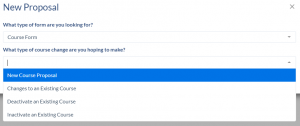
Select Course Form from the “What type of form are you looking for” drop-down.

Select the appropriate form from the “What type of course change are you hoping to make?” drop-down.
- New Course Proposal – submit a new course for review.
- Deactivate an Existing Course – submit a request to deactivate an existing course (remove from the catalog).
- Courses not planning to be taught in the next five years should be deactivated.

Click GO TO FORM.

Courses - Edit Existing
NOTE: If you wish to complete a section edit (as opposed to a course edit), please see How do I edit a section after the open editing phase of Scheduling has ended?
To edit an existing course:
Login to Coursedog
Select Curriculum from the Product page. (If you only have access to curriculum, you will login directly to the home page.)
Select New Proposal from the right-hand side under Actions.
Select Course Form from the “What type of form are you looking for” drop-down.
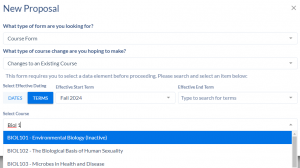
Select the Changes to an Existing Course from the “What type of course change are you hoping to make?” drop-down.

Select the appropriate term to implement the change from the Effective Start Term drop-down. Leave Effective End Term blank.

Search for the course to edit either by subject code/course number or by title.
Click GO TO FORM
Curriculum - Add New
Login to Coursedog
Select Curriculum from the Product page. (If you only have access to curriculum, you will login directly to the home page.)
Select New Proposal from the right-hand side under Actions.
Select Major/Minor Form from the “What type of form are you looking for” drop-down.
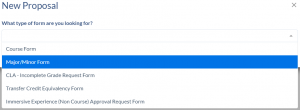
Select the appropriate form from the “What type of change are you hoping to make?” drop-down.
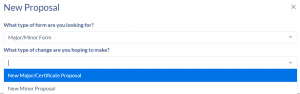
- New Major/Certificate Proposal – submit a new major or certificate for review.
- New Minor Proposal – submit a new minor for review.
Click GO TO FORM.
Curriculum - Edit Existing
Login to Coursedog
Select Curriculum from the Product page. (If you only have access to curriculum, you will login directly to the home page.)
Select New Proposal from the right-hand side under Actions.
Select Major/Minor Form from the “What type of form are you looking for” drop-down.
Select the appropriate form from the “What type of change are you hoping to make?” drop-down.
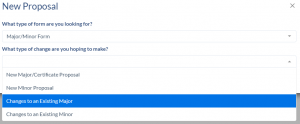
- Changes to an Existing Major – make changes to an existing major/certificate including changes to requirements, concentrations, etc.
- Changes to an Existing Minor – make changes to an existing minor including changes to requirements, program description, etc.
Select the appropriate term to implement the change from the Effective Start Term drop-down. Leave Effective End Term blank.

Search for the major/minor/concentration to edit by code or description.

Click GO TO FORM.